
184 lines
5.2 KiB
Markdown
184 lines
5.2 KiB
Markdown
# 最小堆
|
||
|
||
在 Scheduler 中,使用最小堆的数据结构在对任务进行排序。
|
||
|
||
```js
|
||
// 两个任务队列
|
||
var taskQueue: Array<Task> = [];
|
||
var timerQueue: Array<Task> = [];
|
||
|
||
push(timerQueue, newTask); // 像数组中推入一个任务
|
||
pop(timerQueue); // 从数组中弹出一个任务
|
||
timer = peek(timerQueue); // 从数组中获取第一个任务
|
||
```
|
||
|
||
|
||
|
||
## 二叉堆基本知识
|
||
|
||
|
||
|
||
### 二叉树
|
||
|
||
所谓二叉树,指的是一个父节点只能有1个或者2个子节点,例如下图:
|
||
|
||
<img src="https://xiejie-typora.oss-cn-chengdu.aliyuncs.com/2022-12-30-055103.png" alt="image-20221230135103093" style="zoom:50%;" />
|
||
|
||
总之就是不能多余两个节点。
|
||
|
||
|
||
|
||
### 完全树
|
||
|
||
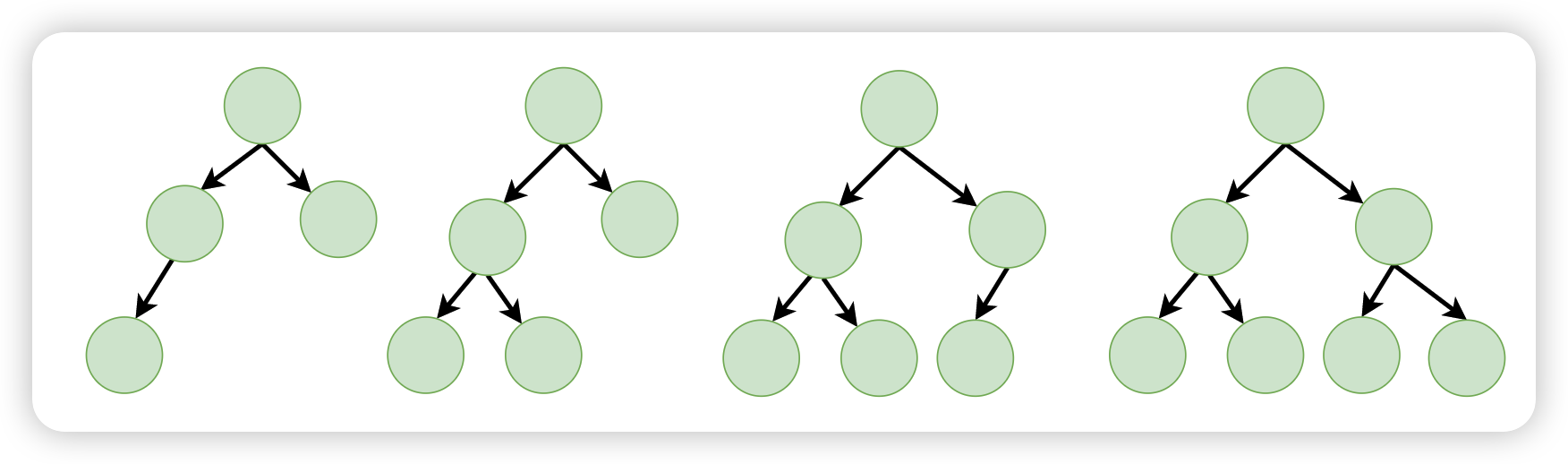
所谓完全树,指的是一棵树再进行填写的时候,遵循的是“从左往右,从上往下”
|
||
|
||
例如下面的这些树,就都是完全树:
|
||
|
||
|
||
|
||
再例如,下面的这些树,就不是完全树:
|
||
|
||
<img src="https://xiejie-typora.oss-cn-chengdu.aliyuncs.com/2022-12-30-055856.png" alt="image-20221230135856627" style="zoom:50%;" />
|
||
|
||
### 完全树中的数值
|
||
|
||
可以分为两大类:
|
||
|
||
- 最大堆:父节点的数值大于或者等于所有的子节点
|
||
- 最小堆:刚好相反,父节点的数值小于或者等于所有的子节点
|
||
|
||
最大堆示例:
|
||
|
||
<img src="https://xiejie-typora.oss-cn-chengdu.aliyuncs.com/2022-12-30-060219.png" alt="image-20221230140218584" style="zoom:50%;" />
|
||
|
||
最小堆示例:
|
||
|
||
<img src="https://xiejie-typora.oss-cn-chengdu.aliyuncs.com/2022-12-30-060339.png" alt="image-20221230140339328" style="zoom:50%;" />
|
||
|
||
- 无论是最大堆还是最小堆,第一个节点一定是这个堆中最大的或者最小的
|
||
- 每一层并非是按照一定顺序来排列的,比如下面的例子,6可以在左分支,3可以在右分支
|
||
|
||
<img src="https://xiejie-typora.oss-cn-chengdu.aliyuncs.com/2022-12-30-060935.png" alt="image-20221230140935130" style="zoom:50%;" />
|
||
|
||
- 每一层的所有元素并非一定比下一层(非自己的子节点)大或者小
|
||
|
||
|
||
|
||
### 堆的实现
|
||
|
||
堆一般来讲,可以使用数组来实现
|
||
|
||
<img src="https://xiejie-typora.oss-cn-chengdu.aliyuncs.com/2022-12-30-061555.png" alt="image-20221230141555180" style="zoom:50%;" />
|
||
|
||
通过数组,我们可以非常方便的找到一个节点的所有亲属
|
||
|
||
- 父节点:Math.floor((当前节点的下标 - 1) / 2)
|
||
|
||
| 子节点 | 父节点 |
|
||
| ------ | ------ |
|
||
| 1 | 0 |
|
||
| 3 | 1 |
|
||
| 4 | 1 |
|
||
| 5 | 2 |
|
||
|
||
- 左分支节点:当前节点下标 * 2 + 1
|
||
|
||
| 父节点 | 左分支节点 |
|
||
| ------ | ---------- |
|
||
| 0 | 1 |
|
||
| 1 | 3 |
|
||
| 2 | 5 |
|
||
|
||
- 右分支节点:当前节点下标 * 2 + 2
|
||
|
||
| 父节点 | 右分支节点 |
|
||
| ------ | ---------- |
|
||
| 0 | 2 |
|
||
| 1 | 4 |
|
||
| 2 | 6 |
|
||
|
||
|
||
|
||
## react 中对最小堆的应用
|
||
|
||
在 react 中,最小堆对应的源码在 *SchedulerMinHeap.js* 文件中,总共有 6 个方法,其中向外暴露了 3 个方法
|
||
|
||
- push:向最小堆推入一个元素
|
||
- pop:弹出一个
|
||
- peek:取出第一个
|
||
|
||
没有暴露的是:
|
||
|
||
- siftUp:向上调整
|
||
- siftDown:向下调整
|
||
- compare:这是一个辅助方法,就是两个元素做比较的
|
||
|
||
所谓向上调整,就是指将一个元素和它的父节点做比较,如果比父节点小,那么就应该和父节点做交换,交换完了之后继续和上一层的父节点做比较,依此类推,直到该元素放置到了正确的位置
|
||
|
||
<img src="https://xiejie-typora.oss-cn-chengdu.aliyuncs.com/2022-12-30-062926.png" alt="image-20221230142926067" style="zoom:50%;" />
|
||
|
||
向下调整,就刚好相反,元素往下走,先和左分支进行比较,如果比左分支小,那就交换。
|
||
|
||
|
||
|
||
### peek
|
||
|
||
取出堆顶的任务,堆顶一定是最小的
|
||
|
||
这个方法极其的简单,如下:
|
||
|
||
```js
|
||
peek(timerQueue);
|
||
export function peek(heap) {
|
||
// 返回这个数组的第一个元素
|
||
return heap.length === 0 ? null : heap[0];
|
||
}
|
||
```
|
||
|
||
|
||
|
||
### push
|
||
|
||
向最小堆推入一个新任务,因为使用的是数组,所以在推入任务的时候,首先该任务是被推入到数组的最后一项,但是这个时候,涉及到一个调整,我们需要向上调整,把这个任务调整到合适的位置
|
||
|
||
```js
|
||
push(timerQueue, newTask);
|
||
export function push(heap, node) {
|
||
const index = heap.length;
|
||
// 推入到数组的最后一位
|
||
heap.push(node);
|
||
// 向上调整,调整到合适的位置
|
||
siftUp(heap, node, index);
|
||
}
|
||
```
|
||
|
||
|
||
|
||
### pop
|
||
|
||
pop 是从任务堆里面弹出第一个任务,也就是意味着该任务已经没有在队列里面了
|
||
|
||
```js
|
||
pop(taskQueue);
|
||
export function pop(heap) {
|
||
if (heap.length === 0) {
|
||
return null;
|
||
}
|
||
// 获取数组的第一个任务(一定是最小的)
|
||
const first = heap[0];
|
||
// 拿到数组的最后一个
|
||
const last = heap.pop();
|
||
if (last !== first) {
|
||
// 将最后一个任务放到第一个
|
||
heap[0] = last;
|
||
// 接下来向下调整
|
||
siftDown(heap, last, 0);
|
||
}
|
||
return first;
|
||
}
|
||
```
|
||
|
||
具体的调整示意图如下:
|
||
|
||
<img src="https://xiejie-typora.oss-cn-chengdu.aliyuncs.com/2022-12-30-064713.png" alt="image-20221230144713347" style="zoom:50%;" />
|