
568 lines
17 KiB
Markdown
568 lines
17 KiB
Markdown
# 3. *Ref*
|
||
|
||
关于 *Ref*,我们在前面入门篇实际上已经有所涉及了,当时通过 *Ref* 获取到 *markdown* 编辑器的 *DOM* 节点,然后获取用户所输入的文档内容。
|
||
|
||
这一讲,我们就来彻底看一下 *Ref*,包含以下的内容:
|
||
|
||
- 过时 *API*:*String* 类型的 *Refs*
|
||
- *createRef API*
|
||
- *Ref* 转发
|
||
- *useRef* 与 *useImperativeHandle*
|
||
|
||
## 过时 *API*:*String* 类型的 *Refs*
|
||
|
||
首先,我们还是需要认识到 *Ref* 是为了解决什么问题。我们都知道,现代前端框架的一大特点就是响应式,开发人员不需要再去手动操作 *DOM* 元素,只需要关心和 *DOM* 元素绑定的响应式数据即可。
|
||
|
||
但是有些时候,我们需要操作 *DOM* 元素,例如官方所列举的这几个场景:
|
||
|
||
- 管理焦点,文本选择或媒体播放
|
||
- 触发强制动画
|
||
- 集成第三方 *DOM* 库
|
||
|
||
在最最早期的时候,*React* 中 *Ref* 的用法非常简单,类似于 *Vue*,给一个字符串类型的值,之后在方法中通过 *this.refs.xxx* 就能够引用到。
|
||
|
||
示例如下:
|
||
|
||
```js
|
||
import React, { Component } from 'react'
|
||
|
||
export default class App extends Component {
|
||
|
||
clickHandle = () => {
|
||
console.log(this);
|
||
console.log(this.refs.inputRef);
|
||
this.refs.inputRef.focus();
|
||
}
|
||
|
||
render() {
|
||
return (
|
||
<div>
|
||
<input type="text" ref="inputRef"/>
|
||
<button onClick={this.clickHandle}>聚焦</button>
|
||
</div>
|
||
)
|
||
}
|
||
}
|
||
```
|
||
|
||
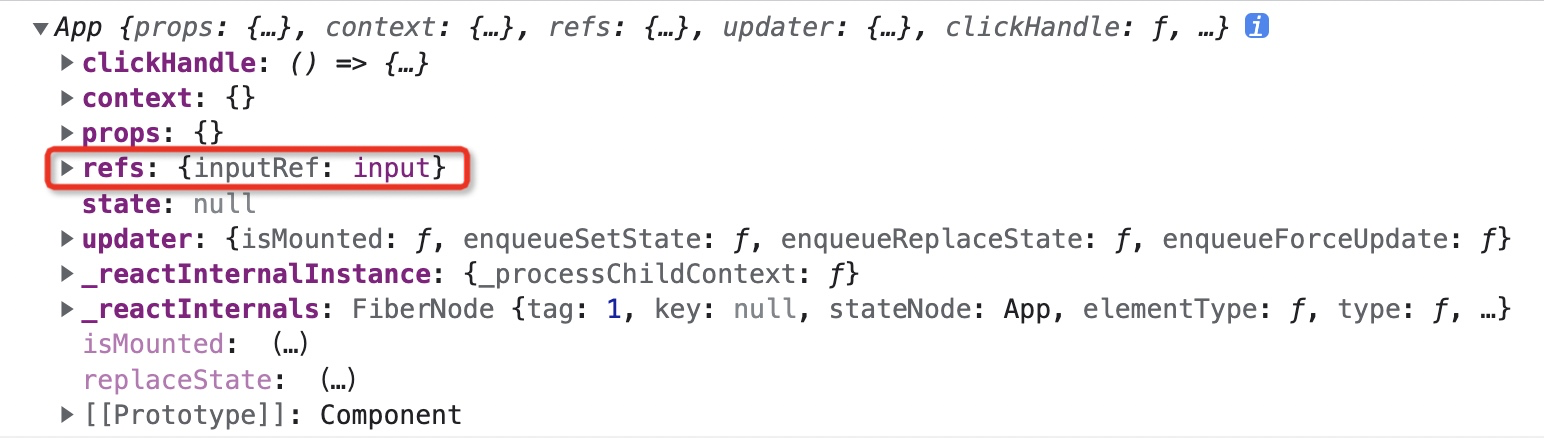
在上面的代码中,我们在 *input* 上面挂了一个 *ref* 属性,对应的值为 *inputRef*,之后查看组件实例,可以看到该组件实例中的 *refs* 里面就保存了该 *input* 的 *DOM* 元素。
|
||
|
||
|
||
|
||
然后我们就可以像之前一样进行 *DOM* 元素的操作了。例如在上面的示例中我们进行了聚焦的操作。
|
||
|
||
但是这里需要注意两点:
|
||
|
||
- 避免使用 *refs* 来做任何可以通过声明式实现来完成的事情
|
||
- 该 *API* 已经过时,可能会在未来的版本被移除,官方建议我们使用回调函数或 *createRef API* 的方式来代替
|
||
|
||
参阅官网 *https://zh-hans.reactjs.org/docs/refs-and-the-dom.html#legacy-api-string-refs*
|
||
|
||
至于为什么 *String* 类型的 *Refs* 会被废弃,主要是以下几个方面原因:
|
||
|
||

|
||
|
||
参阅地址:*https://github.com/facebook/react/pull/8333#issuecomment-271648615*
|
||
|
||
## *createRef API*
|
||
|
||
接下来我们来看一下官方推荐的 *createRef API*。
|
||
|
||
示例如下:
|
||
|
||
```js
|
||
import React, { Component } from 'react'
|
||
|
||
export default class App extends Component {
|
||
|
||
constructor(props) {
|
||
super();
|
||
this.inputRef = React.createRef();
|
||
console.log(this.inputRef); // {current: null}
|
||
}
|
||
|
||
clickHandle = () => {
|
||
console.log(this.inputRef); // {current: input}
|
||
this.inputRef.current.focus();
|
||
}
|
||
|
||
render() {
|
||
return (
|
||
<div>
|
||
<input type="text" ref={this.inputRef}/>
|
||
<button onClick={this.clickHandle}>聚焦</button>
|
||
</div>
|
||
)
|
||
}
|
||
}
|
||
```
|
||
|
||
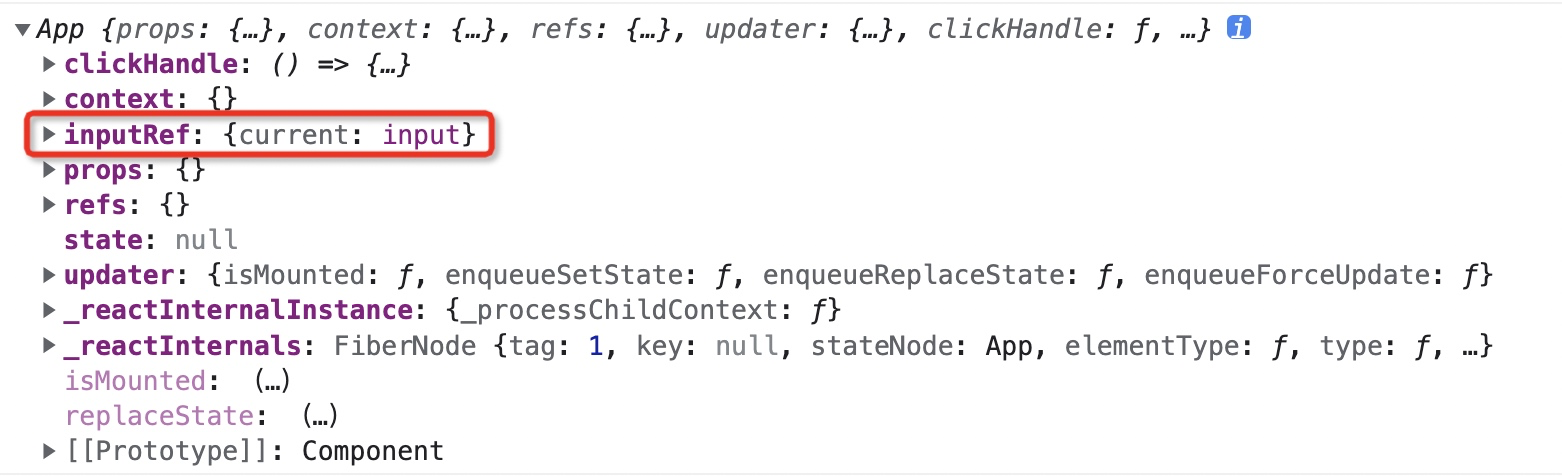
在上面的代码中,我们创建 *Ref* 不再是通过字符串的形式,而是采用的 *createRef* 这个静态方法创建了一个 *Ref* 对象,并在组件实例上面新增了一个 *inputRef* 属性来保存这个 *Ref* 对象。
|
||
|
||
|
||
|
||
*createRef* 这个方法本质也很简单,就是返回了一个 *{current: null}* 的对象,下面是 *createRef* 的源码:
|
||
|
||
<img src="https://xiejie-typora.oss-cn-chengdu.aliyuncs.com/2022-11-30-055424.png" alt="image-20221130135424421" style="zoom:50%;" />
|
||
|
||
最后我们把这个对象和 *input* 进行关联。
|
||
|
||
如果要获取 *DOM* 元素,可以通过 *this.inputRef.current* 来获取。
|
||
|
||
除了在 *JSX* 中关联 *Ref*,我们还可以直接关联一个类组件,这样就可以直接调用该组件内部的方法。例如:
|
||
|
||
```js
|
||
// 子组件
|
||
import React, { Component } from 'react'
|
||
|
||
export default class ChildCom1 extends Component {
|
||
|
||
test = () => {
|
||
console.log("这是子组件的 test 方法");
|
||
}
|
||
|
||
render() {
|
||
return (
|
||
<div>ChildCom1</div>
|
||
)
|
||
}
|
||
}
|
||
```
|
||
|
||
```js
|
||
// 父组件
|
||
import React, { Component } from 'react';
|
||
import ChildCom1 from "./components/ChildCom1"
|
||
|
||
export default class App extends Component {
|
||
|
||
constructor(props) {
|
||
super();
|
||
this.comRef = React.createRef();
|
||
}
|
||
|
||
clickHandle = () => {
|
||
console.log(this);
|
||
console.log(this.comRef); // {current: ChildCom1}
|
||
this.comRef.current.test();
|
||
}
|
||
|
||
render() {
|
||
return (
|
||
<div>
|
||
{/* ref 关联子组件 */}
|
||
<ChildCom1 ref={this.comRef}/>
|
||
<button onClick={this.clickHandle}>触发子组件方法</button>
|
||
</div>
|
||
)
|
||
}
|
||
}
|
||
```
|
||
|
||
>虽然提供这种方式,但这是一种**反模式**,相当于回到了 *jQuery* 时代,因此尽量避免这么做。
|
||
|
||
*React.createRef API* 是在 *React 16.3* 版本引入的,如果是稍早一点的版本,官方推荐使用回调 *Refs*,也就是函数的形式。例如:
|
||
|
||
```js
|
||
import React, { Component } from 'react';
|
||
import ChildCom1 from "./components/ChildCom1"
|
||
|
||
export default class App extends Component {
|
||
|
||
constructor() {
|
||
super();
|
||
this.inputRef = element => {
|
||
this.inputDOM = element;
|
||
};
|
||
this.comRef = element => {
|
||
this.comInstance = element;
|
||
};
|
||
}
|
||
|
||
clickHandle = () => {
|
||
this.inputDOM.focus();
|
||
this.comInstance.test();
|
||
}
|
||
|
||
render() {
|
||
return (
|
||
<div>
|
||
{/* ref 关联子组件 */}
|
||
<input type="text" ref={this.inputRef} />
|
||
<ChildCom1 ref={this.comRef} />
|
||
<div>
|
||
<button onClick={this.clickHandle}>聚焦并且触发子组件方法</button>
|
||
</div>
|
||
</div>
|
||
)
|
||
}
|
||
}
|
||
```
|
||
|
||
你可能会好奇,为什么上面的例子都是使用的类组件,现在不都是使用函数组件了么?这是因为默认情况下,你不能在**函数组件上**使用 *ref* 属性,因为它们没有实例,但是在函数组件内部是可以使用 *ref* 的,这涉及到后面要说的 *useRef*。
|
||
|
||
## *Ref* 转发
|
||
|
||
既然要讲 *Ref*,咱们就一起把它整个知识点一起讲完,接下来要介绍的是*Ref* 的转发。
|
||
|
||
*Ref* 转发是一个可选特性,其允许某些组件接收 *ref*,并将其向下传递(换句话说,“转发”它)给子组件。
|
||
|
||
那么什么时候需要 *Ref* 的转发呢?往往就在使用高阶组件的时候。
|
||
|
||
我们先来看一下如果没有 *Ref* 转发,在高阶组件中使用 *Ref* 会遇到什么问题。
|
||
|
||
```js
|
||
// App.jsx
|
||
import React, { Component } from 'react'
|
||
|
||
import withLogin from "./HOC/withLog";
|
||
import ChildCom1 from "./components/ChildCom1"
|
||
const NewChild = withLogin(ChildCom1);
|
||
|
||
export default class App extends Component {
|
||
constructor() {
|
||
super();
|
||
this.comRef = React.createRef();
|
||
this.state = {
|
||
show: true
|
||
}
|
||
}
|
||
|
||
clickHandle = () => {
|
||
// 查看当前的 Ref 所关联的组件
|
||
console.log(this.comRef);
|
||
}
|
||
|
||
render() {
|
||
return (
|
||
<div>
|
||
<button onClick={() => this.setState({
|
||
show: !this.state.show
|
||
})}>show/hide</button>
|
||
<button onClick={this.clickHandle}>触发子组件方法</button>
|
||
{this.state.show ? <NewChild ref={this.comRef} /> : null}
|
||
</div>
|
||
)
|
||
}
|
||
}
|
||
```
|
||
|
||
```js
|
||
// withLog.js
|
||
import { Component } from "react";
|
||
import { formatDate } from "../utils/tools";
|
||
|
||
// 高阶组件是一个函数,接收一个组件作为参数
|
||
// 返回一个新的组件
|
||
function withLog(Com) {
|
||
// 返回的新组件
|
||
return class extends Component {
|
||
constructor(props) {
|
||
super(props);
|
||
this.state = { n: 1 };
|
||
}
|
||
componentDidMount() {
|
||
console.log(
|
||
`日志:组件${Com.name}已经创建,创建时间${formatDate(
|
||
Date.now(),
|
||
"year-time"
|
||
)}`
|
||
);
|
||
}
|
||
componentWillUnmount() {
|
||
console.log(
|
||
`日志:组件${Com.name}已经销毁,销毁时间${formatDate(
|
||
Date.now(),
|
||
"year-time"
|
||
)}`
|
||
);
|
||
}
|
||
render() {
|
||
return <Com {...this.props} />;
|
||
}
|
||
};
|
||
}
|
||
|
||
export default withLog;
|
||
```
|
||
|
||
```js
|
||
// ChildCom1.jsx
|
||
import React, { Component } from 'react'
|
||
|
||
export default class ChildCom1 extends Component {
|
||
|
||
test = () => {
|
||
console.log("这是子组件的 test 方法");
|
||
}
|
||
|
||
render() {
|
||
return (
|
||
<div>ChildCom1</div>
|
||
)
|
||
}
|
||
}
|
||
```
|
||
|
||
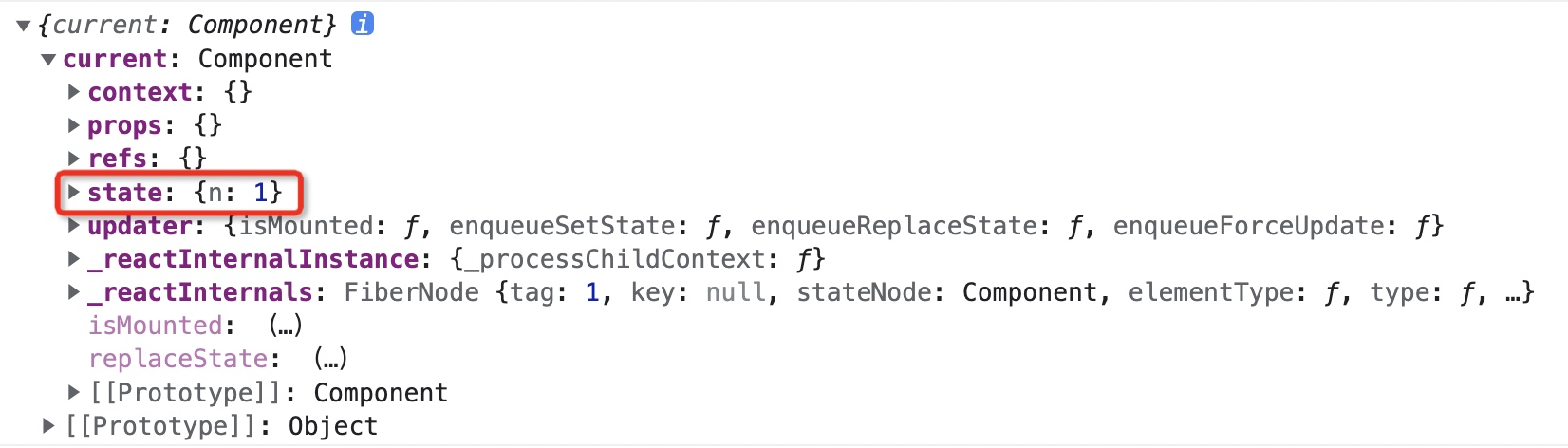
在上面的三段代码中,我们使用了 *withLog* 这个高阶组件来包裹 *ChildCom1* 子组件,从而添加日志功能。在使用由高阶组件返回的增强组件时,我们传递了一个 *Ref*,我们的本意是想要这个 *Ref* 关联原本的子组件,从而可以触发子组件里面的方法。
|
||
|
||
但是我们会发现 *Ref* 关联的是高阶组件中返回增强组件,而非原来的子组件。
|
||
|
||
|
||
|
||
要解决这个问题就会涉及到 *Ref* 的转发。说直白一点就是 *Ref* 的向下传递给子组件。
|
||
|
||
这里 *React* 官方为我们提供了一个 *React.forwardRef API*。我们需要修改的仅仅是高阶组件:
|
||
|
||
```js
|
||
import React, { Component } from "react";
|
||
import { formatDate } from "../utils/tools";
|
||
|
||
// 高阶组件是一个函数,接收一个组件作为参数
|
||
// 返回一个新的组件
|
||
function withLog(Com) {
|
||
// 返回的新组件
|
||
class WithLogCom extends Component {
|
||
constructor(props) {
|
||
super(props);
|
||
this.state = { n: 1 };
|
||
}
|
||
componentDidMount() {
|
||
console.log(
|
||
`日志:组件${Com.name}已经创建,创建时间${formatDate(
|
||
Date.now(),
|
||
"year-time"
|
||
)}`
|
||
);
|
||
}
|
||
componentWillUnmount() {
|
||
console.log(
|
||
`日志:组件${Com.name}已经销毁,销毁时间${formatDate(
|
||
Date.now(),
|
||
"year-time"
|
||
)}`
|
||
);
|
||
}
|
||
render() {
|
||
// 通过 this.props 能够拿到传递下来的 ref
|
||
// 然后和子组件进行关联
|
||
const {forwardedRef, ...rest} = this.props;
|
||
return <Com ref={forwardedRef} {...rest} />;
|
||
}
|
||
}
|
||
|
||
return React.forwardRef((props, ref) => {
|
||
// 这里是关键,渲染函数会自动传入 ref,然后我们将 ref 继续往下传递
|
||
return <WithLogCom {...props} forwardedRef={ref} />;
|
||
});
|
||
}
|
||
|
||
export default withLog;
|
||
```
|
||
|
||
在上面的代码中,*React.forwardRef* 接受一个渲染函数,该函数接收 *props* 和 *ref* 参数并返回原本我们直接返回的增强组件。
|
||
|
||
接下来我们在增强组件的 *render* 方法中,通过 *this.props* 拿到 *ref* 继续传递给子组件。
|
||
|
||
那么 *React.forwardRef* 究竟做了啥呢?源码如下:
|
||
|
||
<img src="https://xiejie-typora.oss-cn-chengdu.aliyuncs.com/2022-11-30-055526.png" alt="image-20221130135525552" style="zoom:50%;" />
|
||
|
||
可以看到,实际上 *forwardRef* 这个静态方法实际上也就是返回一个 *elementType* 的对象而已,该对象包含一个 *render* 方法,也就是我们在使用 *React.forwardRef* 时传入的渲染函数。
|
||
|
||
之所以要这么多此一举,是因为该渲染函数会自动传入 *props* 和 *ref*,关键点就在这里,拿到 *ref* 后,后我们就可以将 *ref* 继续往下面传递给子组件。
|
||
|
||
## *useRef* 与 *useImperativeHandle*
|
||
|
||
关于 *Ref* 这一块,最后要看一下的就是这两个 *Hook*。
|
||
|
||
我们知道,现在整个 *React* 是函数组件大行其道,那么自然我们会遇到函数组件下如何进行 *Ref* 的关联。
|
||
|
||
在函数组件中,官方为我们提供了新的 *useRef* 这个 *Hook*来进行关联,但是也可以使用 *createRef API*,示例如下:
|
||
|
||
```js
|
||
import React from 'react';
|
||
|
||
function App() {
|
||
|
||
const [counter, setCounter] = React.useState(1);
|
||
|
||
const inputRef1 = React.createRef();
|
||
const inputRef2 = React.useRef();
|
||
console.log("inputRef1:", inputRef1); // {current: null}
|
||
console.log("inputRef2:", inputRef2); // {current: undefined}
|
||
|
||
function clickHandle() {
|
||
console.log("inputRef1:", inputRef1); // {current: input}
|
||
console.log("inputRef2:", inputRef2); // {current: input}
|
||
setCounter(counter + 1);
|
||
}
|
||
|
||
return (
|
||
<div>
|
||
<button onClick={clickHandle}>+1</button>
|
||
<div>{counter}</div>
|
||
<div>
|
||
<input type="text" ref={inputRef1} />
|
||
</div>
|
||
<div>
|
||
<input type="text" ref={inputRef2} />
|
||
</div>
|
||
</div>
|
||
);
|
||
}
|
||
|
||
export default App;
|
||
```
|
||
|
||
通过上面的示例我们可以看出,虽然 *createRef* 和 *useRef* 都是创建 *Ref* 的,但是还是有一些区别,主要体现在下面的点:
|
||
|
||
- *useRef* 是 *hooks* 的一种,一般用于 *function* 组件,而 *createRef* 一般用于 *class* 组件
|
||
|
||
- 由 *useRef* 创建的 *ref* 对象在组件的整个生命周期内都不会改变,但是由 *createRef* 创建的 *ref* 对象,组件每更新一次,*ref*对象就会被重新创建
|
||
|
||
实际上,就是因为在函数式组件中使用 *createRef* 创建 *ref* 时存在弊端,组件每次更新,*ref* 对象就会被重新创建,所以出现了 *useRef* 来解决这个问题。
|
||
|
||
*useRef* 还接受一个初始值,这在用作关联 *DOM* 元素时通常没什么用,但是在作为**存储不需要变化**的全局变量时则非常方便。来看下面的例子:
|
||
|
||
```js
|
||
import { useState, useEffect } from 'react';
|
||
|
||
function App() {
|
||
let timer;
|
||
const [counter, setCounter] = useState(1);
|
||
|
||
useEffect(() => {
|
||
timer = setInterval(() => {
|
||
console.log('触发了');
|
||
}, 1000);
|
||
},[]);
|
||
|
||
const clearTimer = () => {
|
||
clearInterval(timer);
|
||
}
|
||
|
||
function clickHandle(){
|
||
console.log(timer);
|
||
setCounter(counter + 1);
|
||
}
|
||
|
||
return (
|
||
<>
|
||
<div>{counter}</div>
|
||
<button onClick={clickHandle}>+1</button>
|
||
<button onClick={clearTimer}>停止</button>
|
||
</>)
|
||
}
|
||
|
||
export default App;
|
||
```
|
||
|
||
上面的写法存在一个问题,如果这个 *App* 组件里有 *state* 变化或者他的父组件重新 *render* 等原因导致这个 *App* 组件重新 *render* 的时候,我们会发现,点击停止按钮,定时器依然会不断的在控制台打印,定时器清除事件无效了。
|
||
|
||
因为组件重新渲染之后,这里的 *timer* 以及 *clearTimer* 方法都会重新创建,*timer* 已经不是存储的之前的定时器的变量了。
|
||
|
||
此时根据 *useRef* 在组件的整个生命周期内都不会改变的特性,我们可以将定时器变量存储到 *useRef* 所创建的对象上面,示例如下:
|
||
|
||
```js
|
||
import { useState, useEffect, useRef } from 'react';
|
||
|
||
function App() {
|
||
let timer = useRef(null);
|
||
const [counter, setCounter] = useState(1);
|
||
|
||
useEffect(() => {
|
||
timer.current = setInterval(() => {
|
||
console.log('触发了');
|
||
}, 1000);
|
||
},[]);
|
||
|
||
const clearTimer = () => {
|
||
clearInterval(timer.current);
|
||
}
|
||
|
||
function clickHandle(){
|
||
console.log(timer);
|
||
setCounter(counter + 1);
|
||
}
|
||
|
||
return (
|
||
<>
|
||
<div>{counter}</div>
|
||
<button onClick={clickHandle}>+1</button>
|
||
<button onClick={clearTimer}>停止</button>
|
||
</>)
|
||
}
|
||
|
||
export default App;
|
||
```
|
||
|
||
最后,我们要看一下另外一个 *useImperativeHandle* 这个 *Hook*。
|
||
|
||
该 *Hook* 一般配合 *React.forwardRef* 使用,主要作用是父组件传入 *Ref* 时,**自定义**要暴露给父组件的实例值。
|
||
|
||
来看一个具体的示例:
|
||
|
||
```js
|
||
import {useRef} from 'react';
|
||
import ChildCom1 from "./components/ChildCom1"
|
||
|
||
function App() {
|
||
|
||
const comRef = useRef();
|
||
|
||
function clickHandle(){
|
||
comRef.current.click();
|
||
}
|
||
|
||
return (
|
||
<div>
|
||
<ChildCom1 ref={comRef}/>
|
||
<button onClick={clickHandle}>触发子组件的方法</button>
|
||
</div>
|
||
);
|
||
}
|
||
|
||
export default App;
|
||
```
|
||
|
||
在父组件中,我们向子组件传递了一个 *Ref*,但是子组件实际上是一个函数组件。之前我们有说过,函数组件本身是无法挂 *Ref* 的,因此此时就需要使用 *React.forwardRef* 进行 *Ref* 的转发,之后配合 *useImperativeHandle* 来自定义要暴露给父组件的实例值。
|
||
|
||
```js
|
||
import React, { useRef, useImperativeHandle } from 'react';
|
||
|
||
function ChildCom1(props, ref) {
|
||
|
||
const childRef = useRef();
|
||
|
||
// 第一个是父组件传递过来的 ref
|
||
// 第二个回调函数返回一个对象,该对象是一个映射关系
|
||
// 映射关系中的键之后能够暴露给父组件使用
|
||
// 映射关系中的值对应的是对应的方法
|
||
useImperativeHandle(ref, () => ({
|
||
click: () => {
|
||
console.log(childRef.current);
|
||
}
|
||
}));
|
||
|
||
function clickHandle() {
|
||
console.log("这是子组件的 test 方法");
|
||
}
|
||
|
||
return (
|
||
<div onClick={clickHandle} ref={childRef}>
|
||
子组件1
|
||
</div>
|
||
);
|
||
}
|
||
|
||
// 需要做 ref 转发
|
||
export default React.forwardRef(ChildCom1);
|
||
```
|
||
|
||
在上面的代码中,我们使用了 *useImperativeHandle* 这个 *Hook*,该 *Hook* 的第一个参数是父组件传递进来的 *ref*,第二个回调函数返回一个对象,该对象是一个映射关系,映射关系中的键之后能够暴露给父组件使用,映射关系中的值对应的是对应的方法。
|
||
|
||
---
|
||
|
||
-*EOF*-
|